IPTV Multicast vs Unicast: Key Differences Explained
Discover the key differences between IPTV multicast and unicast streams. Learn how each method works and which is better for your streaming needs.
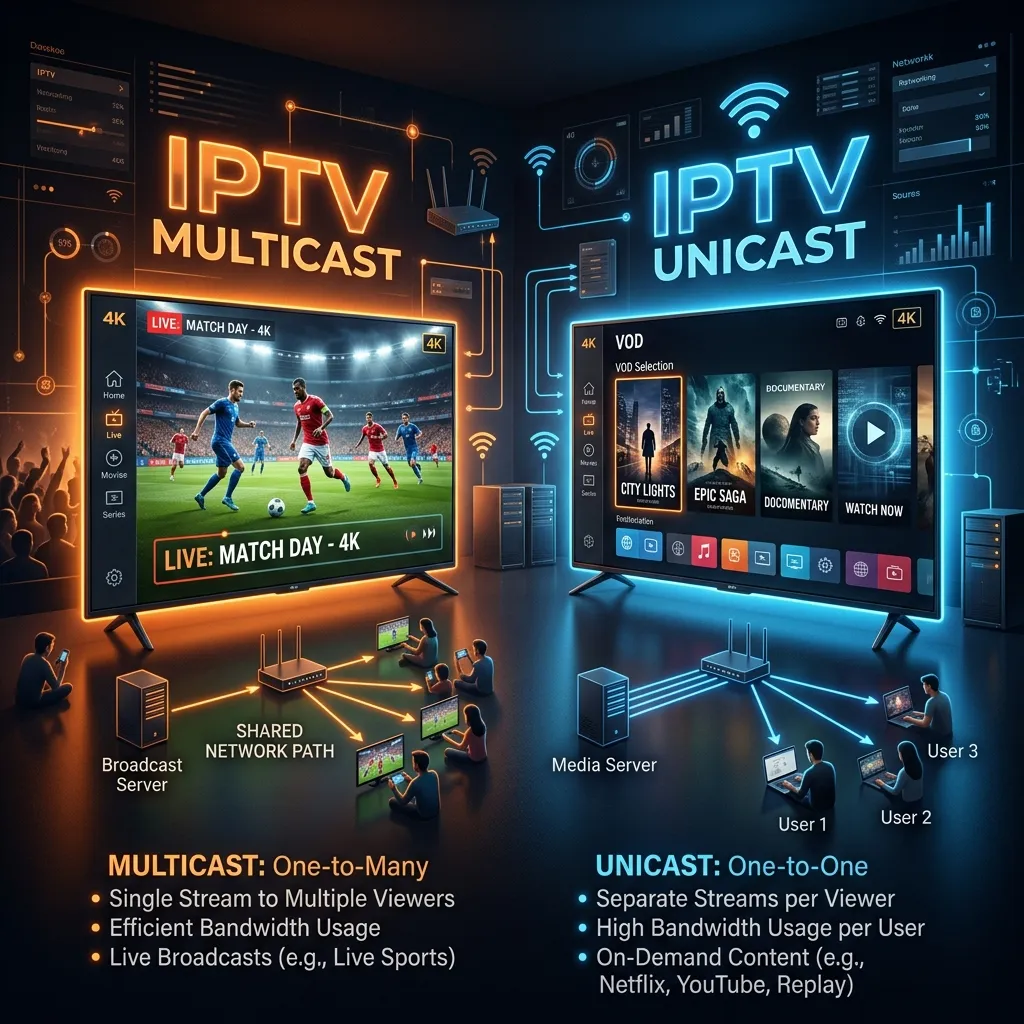
The world of Internet Protocol Television (IPTV) has revolutionized how we consume media, breaking the boundaries of traditional satellite and cable broadcasting. But behind the seamless user interfaces and high-definition streams lies a complex network architecture designed to deliver video content efficiently from servers to your living room. Two of the most critical foundational technologies in this delivery process are Unicast and Multicast streaming.
If you've ever wondered why thousands of people can watch the Super Bowl simultaneously on an IPTV network without the servers crashing, or why you can pause and rewind a movie on demand, the answer lies in understanding the differences between these two transmission methods.
In this exhaustive, massive guide, we will dive deep into the technical and practical differences between IPTV Multicast and Unicast streams. We will explore how they work, their advantages and disadvantages, their ideal use cases, and how modern providers leverage these technologies to deliver uninterrupted entertainment. Welcome to the ultimate resource on IPTV network delivery by Smartiflix, your trusted destination for cutting-edge digital entertainment.
Introduction to IPTV Network Delivery
Internet Protocol Television (IPTV) delivers television content over Internet Protocol (IP) networks. Unlike downloaded media, IPTV offers the ability to stream media in smaller batches directly from the source, allowing viewers to begin playing the content before the entire file has been transmitted. This is what we call streaming.
To understand how IPTV reaches your screen—whether you are using a smart TV, a computer, or an Android box after following our Installation Guide—you must understand the basic concepts of IP routing. In standard internet communication, data is chopped into "packets" and sent across a network. When watching a video, millions of packets are continuously sent to your device, which reassembles them into the moving images and audio you perceive.
However, video is incredibly bandwidth-intensive. A single 4K stream can consume anywhere from 15 to 25 Mbps of continuous data. Now imagine an internet service provider (ISP) trying to deliver that same 4K stream to one million subscribers simultaneously. If not handled correctly, this would require 25 Terabits per second (Tbps) of bandwidth, easily crippling the provider's infrastructure.
This is where the concepts of Unicast and Multicast routing come into play. They are the two primary methods used by network engineers to solve the puzzle of delivering massive amounts of video data over IP networks efficiently. These routing mechanisms determine not only the quality of the stream you receive but also the overall stability of the internet infrastructure that supports it. By mastering these concepts, viewers can better understand what makes a high-quality stream reliable and network administrators can better architect robust media delivery systems.
What is Unicast Routing in IPTV?
Unicast is the most common form of communication on the internet today. In a unicast transmission, there is a one-to-one connection between the sender (the streaming server) and the receiver (your device).
How Unicast Works
In a unicast IPTV environment, when you request to watch a video, your device sends a message to the IPTV server asking for the stream. The server acknowledges this request and opens a dedicated, private connection specifically for your device. It then begins sending the video packets directly to your IP address.
If your neighbor decides to watch the exact same video at the exact same time, their device will also contact the server. The server will open a second, completely separate connection and send a duplicate stream of packets to your neighbor's IP address.
Every single viewer requires their own dedicated connection and their own dedicated stream of data. If there are 10,000 viewers watching the same channel, the server is sending out 10,000 separate streams. This is akin to a postal worker delivering a separate, identical letter to 10,000 different houses.
Advantages of Unicast
- On-Demand Flexibility: Unicast is the backbone of Video on Demand (VOD) services. Because every connection is unique and independent, you have total control over your viewing experience. You can pause, rewind, fast-forward, or stop the stream without affecting anyone else.
- Personalization and Analytics: Unicast allows for a highly personalized experience. Providers can insert targeted advertisements based on your viewing habits or demographics. They can also seamlessly adjust the video quality based on your specific internet connection speed at any given moment. Because the server has a direct connection with every single client, it is incredibly easy for providers to track exactly who is watching what, for how long, and on what device.
- Broad Compatibility (OTT): Unicast traffic travels over standard internet protocols (like TCP or standard UDP) and requires no special hardware or configurations on network routers. It works flawlessly across the open internet (OTT - Over-The-Top), passing through regular consumer Wi-Fi routers, network address translation (NAT), and firewalls without issue.
- Adaptive Bitrate Streaming (ABR): Since the server maintains a unique session for each user, it can monitor the client's buffer health and dynamically shift the quality of the video up or down. If your home network suddenly experiences congestion, a unicast stream can seamlessly drop from 4K down to 1080p to prevent buffering, ensuring continuous playback.
Disadvantages of Unicast
- Massive Bandwidth Consumption: The biggest drawback of unicast is its inefficiency when delivering the same content to many people simultaneously (like live TV broadcasting). Because the server must duplicate the stream for every viewer, bandwidth requirements scale linearly. 1 viewer = 1 stream. 1,000,000 viewers = 1,000,000 streams.
- High Server Load: Maintaining thousands or millions of concurrent, unique TCP/UDP connections requires tremendous processing power, memory, and specialized load-balancing infrastructure at the server level.
- Latency Issues on Busy Networks: When highly popular live events occur (like major sporting finals), unicast servers and the network pathways leading to them can become overwhelmed. This bottlenecking can lead to buffering, degraded video quality, or outright connection failures for users.
What is Multicast Routing in IPTV?
Multicast is a one-to-many communication method. Instead of establishing a separate connection for every single user, the server sends out only one single stream of data, regardless of how many people are watching.
How Multicast Works
In a multicast IPTV network, the streaming server sends a single copy of the video stream to a specific Multicast IP address (typically in the Class D range: 224.0.0.0 to 239.255.255.255).
When you want to watch this channel, your device (often a specialized IPTV Set-Top Box provided by an ISP) sends a request (called an IGMP join message) to your local network router, essentially saying, "I want to tune into the multicast stream currently broadcasting at address 239.1.1.1."
The network routers then dynamically build a "distribution tree." As the single stream of video travels through the network from the server, the routers along the path duplicate the packets only at the specific network branches where users have explicitly requested the stream. By the time the data reaches the edge of the network (your local neighborhood), it has been efficiently split and delivered to everyone who asked for it, while the core network backbone only ever carried a single copy of the stream.
Advantages of Multicast
- Unmatched Bandwidth Efficiency: Multicast is the ultimate solution for live TV delivery. Whether 10 people or 10 million people are watching a live broadcast, the streaming server only outputs a single stream, and the core network only carries a single stream. The bandwidth savings for network operators are astronomical.
- Extremely Low Server Load: Because the server is only pushing out one stream, it requires very little processing power. The heavy lifting of duplicating the data is intelligently offloaded to the network routers (switches and edge routers) closer to the end user.
- Infinite Scalability for Live Events: Multicast networks can scale to virtually infinite numbers of simultaneous viewers for live events without degrading performance or causing buffering at the source. Flash crowds do not crash multicast servers.
- True Low Latency: Because the stream flows constantly and users simply "tune in" to it as it passes by (much like tuning a radio to an FM frequency), multicast typically offers very low latency. It does not require the heavy buffering common in HTTP-based unicast streams, making it perfect for live sports where delays ruin the experience.
Disadvantages of Multicast
- No Interactivity (By Default): Because everyone is watching the exact same stream at the exact same time, you cannot pause, rewind, or fast-forward a multicast stream. If you pause, you would theoretically be pausing the stream for everyone. (Note: Modern providers solve this by transparently switching you to a unicast stream the moment you hit "pause" on your remote).
- Strict Infrastructure Requirements: Multicast does not work over the standard, public internet. The routers between the server and the viewer must explicitly support and be configured for multicast routing protocols (like PIM and IGMP). This is why multicast is almost exclusively used on closed, managed networks (like when your ISP provides both your internet and your IPTV service over their proprietary fiber lines).
- Complex Troubleshooting: When a multicast stream fails, it can be notoriously difficult to diagnose. The issue could be at the server, at any of the dozens of complex routers along the distribution tree, or an IGMP snooping failure on the customer's inexpensive home network switch.
- No Adaptive Bitrate Support: Traditional multicast streams are broadcast at a fixed bitrate. If a user's home network connection suddenly experiences interference, the stream will simply stutter, pixelate, or fail completely, rather than dynamically dropping to a lower resolution to maintain playback.
Multicast vs. Unicast: A Detailed Technical Comparison
To fully grasp the magnitude of the differences, let's break down how Multicast and Unicast compare across several critical technical and economic domains.
Table: Quick Comparison Matrix
| Feature/Metric | Unicast | Multicast |
|---|---|---|
| Transmission Type | One-to-One | One-to-Many |
| Bandwidth Usage | High (Scales linearly with users) | Low (Constant, regardless of users) |
| Server CPU Load | Very High | Very Low |
| Primary Use Case | VOD, Catch-up TV, OTT Apps | Live TV on Managed Networks |
| Network Needed | Standard Internet (OTT) | Managed Networks (ISP infrastructure) |
| Interactivity | High (Pause, Rewind, FFWD) | Low (Watch only, like traditional TV) |
| Adaptive Bitrate | Supported natively | Not easily supported |
| Targeted Ads | Easy to implement per-user | Difficult (requires client-side logic) |
| Protocol Example | HTTP, HLS, DASH, RTSP | UDP, RTP, IGMP |
Bandwidth and Network Efficiency Analysis
Let’s use a mathematical example to illustrate bandwidth efficiency. Suppose an IPTV provider is broadcasting a live football match in 4K resolution at a steady bitrate of 20 Mbps.
- In a Unicast scenario with 100,000 viewers: The server must send 100,000 individual streams. 100,000 * 20 Mbps = 2,000,000 Mbps (or 2 Terabits per second). This requires a massive, expensive Content Delivery Network (CDN) to handle the load and prevent network collapse.
- In a Multicast scenario with 100,000 viewers: The server outputs a single stream. The bandwidth used at the server level is exactly 20 Mbps. The network routers handle the duplication at the "last mile," meaning the core internet pipes are kept completely free of congestion.
This stark difference is why traditional ISPs operating their own closed networks heavily favored multicast for their initial IPTV deployments over the last two decades.
Cost Implications for Providers
The economic models behind these two technologies dictate how services are priced and structured.
- Unicast Costs: Because bandwidth scales with viewers, unicast providers must pay exorbitant fees for CDN bandwidth. Every minute you watch costs them money. This is why many unicast streaming services regularly increase their prices.
- Multicast Costs: The primary cost is the initial infrastructure (routers, switches, fiber lines). Once the network is built, adding a million new viewers to a live multicast stream costs the provider virtually nothing in additional bandwidth.
When considering a service, take a look at flexible Pricing plans to understand how modern providers balance these costs to offer competitive rates while utilizing advanced unicast CDNs for maximum reliability.
Server Load and Scalability Deep Dive
With unicast, the bottleneck is often the streaming server or the edge CDN servers. If a sudden surge of traffic hits (e.g., the series finale of a highly anticipated show drops), the servers can run out of sockets, memory, or CPU cycles trying to establish and maintain hundreds of thousands of individual TCP sessions. This results in the dreaded "Service Unavailable" errors.
Multicast effectively eliminates the server bottleneck. The server operates in a "fire and forget" mode via UDP. It simply pushes packets out to the multicast address and doesn't bother tracking who is receiving them or if they arrived successfully. The scalability is limited only by the capacity of the network's switches and routers to process IGMP join requests and duplicate packets at wire speed.
Latency and Real-Time Delivery
Latency—the delay between the live event happening in reality and it appearing on your screen—is a critical factor for sports fans. You don't want to hear your neighbors cheering for a goal 30 seconds before you see it on your screen.
Unicast OTT streams (like those using HLS or DASH protocols) often rely on TCP and use large chunks of video (buffers) to ensure smooth playback across the unpredictable public internet. This buffering inherently introduces latency, sometimes up to 30-45 seconds behind real-time.
Multicast streams generally use UDP (User Datagram Protocol), which does not require handshakes, acknowledgments, or large buffers. Packets are streamed rapidly in real-time. If a packet is lost, it is skipped rather than retransmitted. This allows multicast to achieve latency closer to traditional satellite or terrestrial broadcasts (often under 3-5 seconds).
User Experience and Interactivity
This is where Unicast shines brilliantly. Modern consumers demand control. They want to start a movie, pause it to answer the door, and resume seamlessly. They want personalized watchlists and recommendations. Unicast makes all of this possible because the session is unique to the user.
If you are exploring premium IPTV Subscription services, you will notice that the vast library of Video on Demand (VOD) content—movies, series, documentaries—is delivered entirely via unicast.
Multicast, conversely, is a strictly passive viewing experience. You turn on the channel, and you watch what is currently broadcasting, just like tuning into an old-school UHF antenna broadcast.
The Role of Protocols: IGMP, RTSP, HLS, and DASH
To fully comprehend how these streams reach your devices—whether that's a sophisticated smart TV or a device set up via our comprehensive Firestick Setup guide—we must touch upon the underlying network protocols.
IGMP in Multicast
The Internet Group Management Protocol (IGMP) is the beating heart of multicast on IPv4 networks (MLD is used for IPv6).
- IGMP Join: When you change the channel on a multicast IPTV box, it sends an "IGMP Join" message to the local router.
- IGMP Leave: When you change the channel again, it sends an "IGMP Leave" message for the old channel, telling the router to stop sending those packets to conserve local network bandwidth, and simultaneously sends a new Join for the new channel.
- IGMP Snooping: This is a crucial feature on home network switches. Without IGMP snooping, a dumb switch will treat multicast traffic like a broadcast storm and flood the video packets to every single Ethernet port and Wi-Fi device in your house, crippling your home network instantly. IGMP snooping ensures the switch intelligently only sends the video packets to the specific port where the IPTV box is plugged in.
RTSP, HLS, and DASH in Unicast
Unicast relies on a different set of protocols, heavily adapted for modern web delivery and firewall traversal.
- RTSP (Real-Time Streaming Protocol): An older protocol used for establishing and controlling media sessions. While it can be used for both unicast and multicast, it is less common in modern OTT environments due to severe firewall traversal issues.
- HLS (HTTP Live Streaming): Developed by Apple, HLS breaks video into small, downloadable HTTP chunks (usually 2 to 10 seconds long). It uses standard HTTP (TCP port 80/443), meaning it easily bypasses firewalls, proxies, and NAT routers. This is the dominant protocol for OTT unicast today. It inherently supports Adaptive Bitrate by providing a "playlist" of different quality chunks.
- MPEG-DASH (Dynamic Adaptive Streaming over HTTP): An open, international standard similar to HLS. It also chunks video and uses HTTP, and is widely used by massive platforms like YouTube, Netflix, and modern IPTV providers.
Use Cases: When to Use Multicast vs Unicast
The choice between Multicast and Unicast is rarely an "either/or" scenario for large-scale operations. Network engineers deploy them based on the specific requirements of the application.
Best Scenarios for Multicast
- Closed-Network ISP IPTV: Telecom companies that own the fiber or copper lines running directly to your house (like AT&T U-verse or European fiber providers) use multicast for their live TV channels. Because they control the physical network from the server all the way to your living room router, they can ensure multicast routing protocols are supported the entire way without interference.
- Corporate Enterprise Networks: Large corporations delivering a live CEO address to 10,000 employees in various office buildings will use multicast on their internal LANs. If they used unicast, 10,000 simultaneous streams would instantly collapse the company's internet connection.
- Hotels, Hospitals, and Campuses: Delivering live TV channels to hundreds of rooms in a single building is highly efficient using a local multicast streaming server (a headend) on the property's internal network.
Best Scenarios for Unicast
- Over-The-Top (OTT) Streaming: Any service that delivers video over the open, unmanaged, public internet (Netflix, Hulu, YouTube, and independent IPTV applications) must use unicast. The global internet routers purposefully drop multicast packets; they simply will not route them over wide-area boundaries to prevent massive denial-of-service storms.
- Video on Demand (VOD): As discussed, any non-live content that requires user interactivity (pause, rewind) must be unicast.
- Mobile Streaming: Delivering video to smartphones moving between cell towers and various Wi-Fi networks relies entirely on unicast (usually HLS). Maintaining multicast group memberships across rapidly changing mobile network topologies is highly unreliable and essentially impossible.
The Shift Towards OTT and Unicast Dominance
In the early days of IPTV, the "managed network" approach using multicast was considered the absolute gold standard. Telecom operators firmly believed that owning the physical network was the only way to guarantee Quality of Service (QoS) and prevent buffering.
However, the landscape has shifted dramatically over the last decade. Several converging technological factors have led to Unicast completely dominating the modern digital entertainment sphere:
- The Rise of Global CDNs: Content Delivery Networks (like Cloudflare, Akamai, and AWS CloudFront) have built massive, globally distributed infrastructures. They cache video content geographically extremely close to the user. Instead of streaming from a central server across the globe, unicast streams are now served from edge servers just a few miles from your house. This effectively mitigates the "high bandwidth" disadvantage of unicast by keeping the heavy traffic off the long-haul internet backbone.
- Adaptive Bitrate Streaming (ABR): The invention of HLS and DASH protocols revolutionized unicast by introducing ABR. The player device constantly monitors its internet speed and buffer health. If the connection drops due to Wi-Fi interference, it smoothly requests lower-resolution chunks. If it speeds up, it requests 4K chunks. This ensures continuous, buffer-free playback over unpredictable internet connections, a feat traditional rigid multicast streams struggle to achieve.
- The Demand for "Anywhere" Viewing: Consumers no longer want to be tied to a specific, clunky set-top box provided by their ISP, tethered to a living room television. They want to watch on their phones on the train, their smart TVs in the bedroom, their laptops at work, and while traveling internationally. This OTT flexibility inherently demands Unicast over the public internet.
If you are looking for highly flexible, high-quality, anywhere-access streaming, you are likely looking at advanced OTT unicast solutions.
How Modern Providers Leverage Both: The Hybrid Approach
The most sophisticated and expensive IPTV deployments today actually use a hybrid approach to get the absolute best of both worlds, though this is incredibly complex to engineer.
In a managed network scenario (like a tier-1 ISP providing TV service), the provider will broadcast the live channels using Multicast to save core network bandwidth.
However, they know modern users expect to be able to pause live TV. When a user presses "Pause" on their remote, the set-top box instantly sends an IGMP Leave message to the router to drop the live multicast stream. Simultaneously, it opens a brand new Unicast connection to a specialized VOD/Timeshift server deep in the ISP network that has been secretly recording the multicast stream.
When the user presses "Play," they are now receiving a personalized unicast stream from the exact point they paused. This seamless, invisible switching between multicast (for network efficiency) and unicast (for user control) is what makes modern premium ISP set-top boxes feel so magical.
Furthermore, technologies like Multicast ABR (mABR) are emerging. mABR attempts to wrap modern HTTP chunked video (like HLS) inside multicast packets. The local home gateway router receives the multicast packets, unpacks them into standard HTTP unicast chunks, and serves them locally to mobile devices in the home over standard Wi-Fi. This brilliantly bridges the gap between massive network efficiency and modern mobile device compatibility.
Security Considerations: Is Multicast Safer than Unicast?
When evaluating IPTV services, security and privacy are paramount concerns for many users. Understanding how data routing impacts your security is critical. We strongly recommend reading our comprehensive Security Guide to ensure your viewing habits remain private and secure from prying eyes.
Security in Unicast Networks
Because unicast relies on one-to-one connections over standard internet protocols, it is straightforward to secure using standard web technologies.
- Strong Encryption: Unicast streams (especially OTT HLS/DASH) can be easily encrypted using HTTPS (TLS/SSL). This mathematically encrypts the packets from the server all the way to your device, preventing ISPs, government agencies, or hackers on public Wi-Fi from snooping on what exactly you are watching.
- DRM (Digital Rights Management): Unicast is ideal for delivering complex DRM keys to specific authorized users, ensuring that only paying subscribers can decrypt the video chunks.
- VPN Compatibility: Unicast traffic routes perfectly through Virtual Private Networks (VPNs). If you use a VPN for privacy, your unicast IPTV stream will pass through the encrypted tunnel without any issue whatsoever, completely masking your viewing activity and bypassing ISP throttling.
Security in Multicast Networks
Multicast presents unique and often frustrating security challenges.
- Lack of Inherent Encryption: Traditionally, multicast UDP streams on closed networks were transmitted entirely in the clear. The security relied solely on the physical security of the ISP's fiber network.
- Rogue Senders and Receivers: In a poorly configured corporate or local network, anyone can theoretically send data to a multicast IP address, potentially injecting malicious content into a stream. Similarly, anyone on the local network segment could potentially listen in on a multicast stream by sending an IGMP Join request, unless strict access controls are implemented at the switch level.
- Total VPN Incompatibility: Most commercial VPNs designed for consumers do not support multicast routing. If you turn on a VPN on your router or device, your IGMP Join requests will not route through the VPN tunnel, and you will instantly lose access to your managed-network multicast IPTV service. Multicast generally entirely bypasses VPNs, exposing your traffic.
For users prioritizing privacy and who wish to heavily utilize VPNs to protect their traffic, Unicast OTT streaming is fundamentally the superior, safer, and more compatible choice.
Troubleshooting IPTV Stream Issues (Multicast & Unicast)
Understanding the technical foundation helps tremendously when things go wrong. If your IPTV stream is buffering, stuttering, or failing to load, the troubleshooting steps differ wildly depending on which technology is delivering the video.
Troubleshooting Unicast OTT Streams (Buffering, Stuttering)
If your unicast stream (like most OTT apps or VOD services) is acting up, the issue is almost always bandwidth, latency, or routing related.
- Check Local Network Congestion: Is someone else in the house downloading huge video games or streaming multiple 4K videos? Because unicast requires dedicated bandwidth for every stream, network congestion is the #1 enemy. Pause other downloads.
- Wi-Fi Interference: Unicast over Wi-Fi is highly susceptible to packet loss and jitter. Move closer to the router, switch to the 5GHz Wi-Fi band (which has less interference than 2.4GHz), or ideally, use a hardwired Ethernet connection.
- ISP Throttling: Some aggressive ISPs detect long-running unicast video streams and intentionally throttle the bandwidth to save money. Using a reliable VPN can often encrypt the traffic, bypassing this targeted throttling entirely.
- CDN Routing Issues: Sometimes the specific internet route between your ISP and the streaming server is congested due to a broken fiber link somewhere in the country. Restarting your router to obtain a new IP address, or using a VPN to force a different routing path, can quickly fix this.
Troubleshooting Multicast Streams (Freezing, Blank Screens)
Multicast troubleshooting is much more complex and almost always relates to network hardware misconfigurations rather than raw internet speed.
- The Infamous "10-Second Freeze": A classic multicast symptom. You change the channel, the stream plays perfectly for about 10 seconds, and then permanently freezes. This is almost always an IGMP Snooping failure on your local router or network switch. The initial burst of video comes through, but the router fails to maintain the multicast group membership, and the upstream switch stops sending the packets. You must check your router settings.
- Home Network Switch Compatibility: If you have managed switches in your home network, you must ensure IGMP Snooping is explicitly enabled. If you use unmanaged "dumb" switches, they might flood the multicast traffic to all ports, causing your entire Wi-Fi network to crash and disconnect all your wireless devices the moment you turn on the IPTV box.
- Router Firmware Bugs: Ensure your primary gateway router has IGMP Proxy and IGMP Snooping configured correctly. Many default ISP routers handle this poorly and may require firmware updates.
- VPN Interference: As mentioned previously, if you are running a VPN at the router level, it will likely permanently break multicast IPTV from your ISP. Ensure the IPTV box is explicitly excluded from the VPN tunnel (using a feature called split tunneling).
Setting Up Your Network for Optimal IPTV Streaming
To ensure the best possible experience, regardless of whether your provider uses advanced unicast CDNs or local multicast networks, you should prepare your home network hardware.
- Go Wired: Always, always try to connect your primary streaming devices (Smart TVs, Set-Top Boxes, Consoles) via a physical Ethernet cable. Wi-Fi inherently introduces latency, packet loss, and jitter that severely harms both unicast and multicast streams.
- Invest in a Quality Router: Ditch the cheap router provided by your ISP. Invest in a high-quality router capable of handling multiple concurrent connections and supporting modern QoS (Quality of Service) protocols. QoS allows you to prioritize video traffic over background downloads, ensuring your stream never buffers because a laptop decided to update Windows.
- Understand Your Provider's Tech: Know what type of service you are paying for. If it’s a managed service from your internet provider, be extremely cautious about changing router hardware, as you may break their delicate multicast configuration. If it's a modern OTT service like those featured in our premium IPTV Subscription packages, you have complete freedom to optimize your hardware for standard internet traffic.
The Future of IPTV Delivery: Edge Computing and 5G
The networking industry is not standing still. The massive bandwidth requirements of 4K, and the looming arrival of 8K video and VR streaming, are pushing network engineers to innovate constantly.
The future likely belongs to a combination of Edge Computing and Multicast-Assisted ABR (mABR).
The deployment of 5G Networks and Edge Computing will blur the lines further. By placing CDN servers at the very edge of the 5G network (for example, placing a server rack at the physical base of the cell tower in your neighborhood), the latency and bandwidth penalties of unicast are drastically reduced. Your video stream only has to travel a few thousand feet rather than hundreds of miles. This makes high-quality, real-time OTT streaming more viable and reliable than ever before.
Furthermore, as IPv6 adoption continues to grow globally, multicast routing (via MLD - Multicast Listener Discovery) may become slightly easier to deploy over wider areas, though unicast will likely remain the king of commercial OTT delivery due to its undeniable flexibility and consumer demand for interactivity.
Conclusion: Making the Right Choice for Your Entertainment
Understanding the profound differences between IPTV Multicast and Unicast streams demystifies how modern television is delivered to your screen.
- Multicast is the unsung hero of pure network efficiency. It is the powerhouse technology that allows massive ISPs and large corporate networks to broadcast live events to millions of simultaneous viewers without their core infrastructure collapsing under the sheer weight of the data. However, it requires tightly controlled, managed proprietary networks and offers virtually nothing in the way of user interactivity or mobility.
- Unicast is the powerful engine driving the modern, personalized, on-demand streaming revolution. It empowers the OTT (Over-The-Top) services we love today, offering the ability to pause, rewind, enjoy customized adaptive bitrates, and the ultimate freedom to watch anywhere in the world, on any device. While it is inherently bandwidth-hungry, modern global CDNs, advanced compression algorithms, and high-speed fiber internet have made it the undeniable dominant force in digital entertainment.
For the vast majority of consumers today looking to cut the cord, escape restrictive contracts, and enjoy maximum viewing flexibility, OTT Unicast services provide the ultimate experience. They bypass the restrictive hardware and network requirements of legacy ISP systems and deliver massive VOD libraries directly to your preferred devices, wherever you are.
If you are ready to experience the pinnacle of flexible, high-quality streaming utilizing the absolute best of modern unicast CDN delivery networks, we invite you to explore our comprehensive IPTV Subscription options. With Smartiflix, you aren't just buying a television service; you are upgrading to a highly resilient, globally distributed digital entertainment network purposefully designed for the modern, demanding viewer.
Thank you for taking the time to read this ultimate technical guide. For more advanced tips, step-by-step tutorials, and industry insights into the fast-paced world of digital streaming, be sure to return to the Smartiflix Homepage.
Disclaimer: This guide is intended purely for educational purposes to explain deep networking concepts related to IPTV media delivery. Network configurations should be performed carefully, and users should always consult their hardware documentation when making routing or firewall changes.