HLS vs TS IPTV Streaming Formats: Key Differences Explained
Learn about HLS and TS IPTV streaming formats. Discover which protocol provides the best buffering-free experience for seamless viewing.
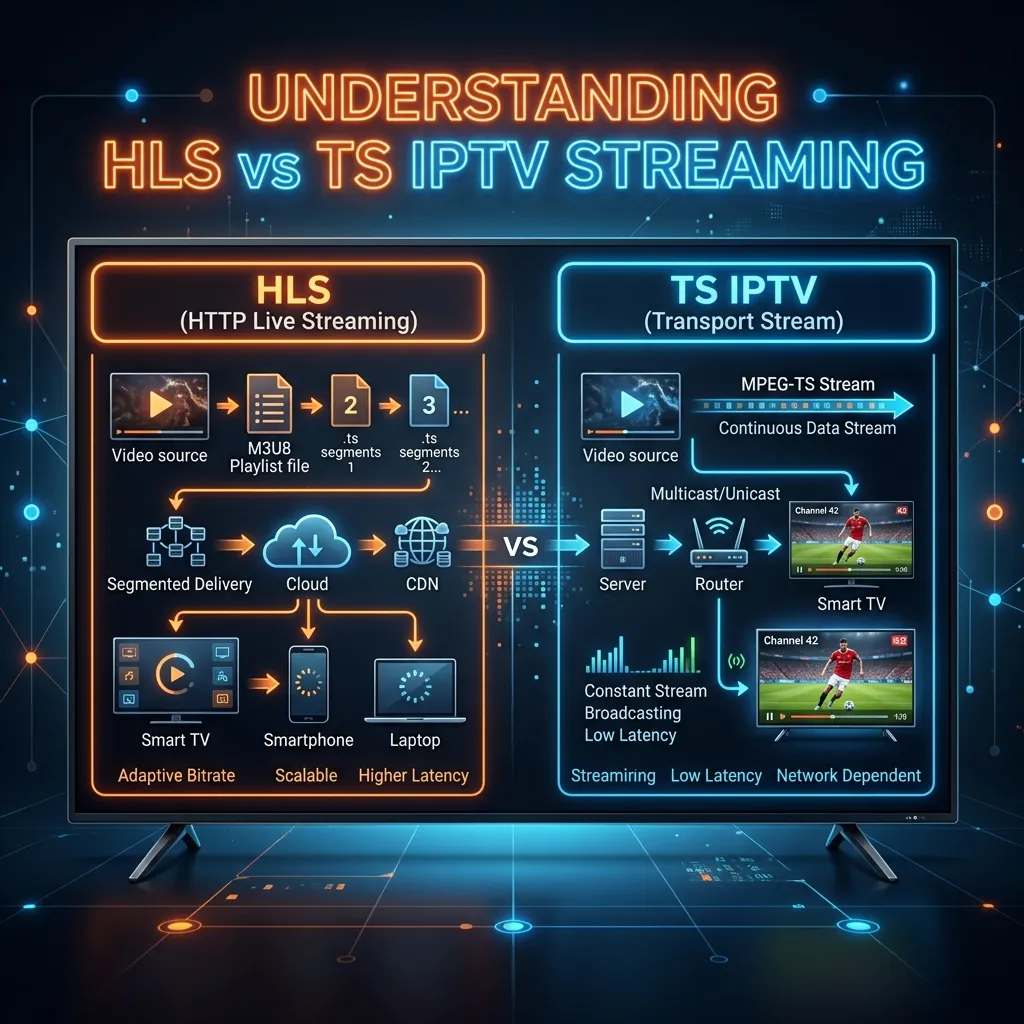
When you dive into the world of Internet Protocol Television (IPTV), you are immediately confronted with a massive array of settings, configurations, and technical jargon. One of the most critical decisions you will make—often hidden away in the advanced settings of your favorite IPTV player—is choosing between HLS (HTTP Live Streaming) and TS (Transport Stream or MPEG-TS). While this might seem like a minor technicality, the choice between HLS and TS fundamentally dictates how video data travels from a remote server across the internet and onto your screen. It affects everything from stream stability and video quality to latency and buffering.
In this exhaustive, 3000+ word guide, we will break down the complex technical architectures of both HLS and TS streaming formats. We will explore their origins, how they package and transmit data, their respective advantages and disadvantages, and ultimately, how to choose the right format for your specific network conditions and hardware setup. Whether you are setting up a home theater system or configuring a mobile device for on-the-go viewing, understanding the DNA of these protocols will dramatically improve your streaming experience.
Welcome to the definitive guide on IPTV streaming formats, brought to you by the Smartiflix Homepage. Let’s dive deep into the digital streams that power modern entertainment.
1. The Evolution of Video Streaming and IPTV
To fully grasp the differences between HLS and TS, we must first understand how video broadcasting has evolved over the past few decades. Traditionally, television was broadcast over the air via radio frequencies, then through coaxial cables, and later via satellite dishes. In these legacy systems, the video signal was continuous. If you tuned your TV to a specific frequency, your television began decoding a never-ending stream of data. If there was a brief interruption in the signal, the picture would pixelate or stutter, but the stream would push forward relentlessly.
As the internet matured, engineers faced a monumental challenge: how do we push massive, continuous video files through a network designed for discrete, asynchronous data packets (the internet)? The initial solutions relied on custom protocols and heavy buffering, which often resulted in a subpar, frustrating user experience.
Enter IPTV, or Internet Protocol Television. By leveraging the same foundational protocols that power web browsing and email, IPTV revolutionized content delivery. However, the internet is an inherently unstable medium. Speeds fluctuate, packets of data get lost in transit, and network congestion can occur at any moment. To combat this, developers created sophisticated streaming protocols designed to package, deliver, and reconstruct video data efficiently.
This is where the divergence between TS (a legacy broadcast standard adapted for the internet) and HLS (a modern, web-native protocol) begins. If you want to experience the cutting edge of these delivery systems, consider checking out our Premium IPTV Subscription.
2. Deep Dive: What is MPEG-TS (Transport Stream)?
The Origins of Transport Stream
MPEG-TS, commonly referred to simply as "TS," stands for Motion Picture Experts Group Transport Stream. It is one of the oldest and most established digital video formats in existence. Developed in the 1990s, it was originally designed for broadcast environments—specifically for Digital Video Broadcasting (DVB) over satellite, cable, and terrestrial networks.
The primary goal of TS was to create a robust, error-resilient format for transmitting audio, video, and data over unreliable legacy mediums where signal degradation was expected. Because it was built for live broadcasting, TS was engineered to be decoded on the fly. You do not need the entire file to begin watching a TS stream; a decoder can simply tune into the stream at any point, synchronize, and start playing.
The Technical Architecture of MPEG-TS
At a microscopic level, a TS stream is incredibly structured. It breaks down raw video and audio into tiny, uniform packets.
- Packet Size: Standard TS packets are exactly 188 bytes in length. This uniform size is a relic of legacy network compatibility (such as ATM networks), but it remains highly efficient for hardware-based decoding.
- Multiplexing: TS is a "container" format. It allows multiple streams of audio, video, and data (like subtitles or electronic program guides) to be multiplexed (combined) into a single, continuous stream.
- PID (Packet Identifier): Every 188-byte packet includes a header with a 13-bit PID. The decoder reads the PID to determine if the packet contains video for channel A, audio for channel A, or data for a completely different channel.
- Tables: The stream continuously transmits metadata tables, primarily the PAT (Program Association Table) and PMT (Program Map Table). These tables act as a roadmap, telling the media player which PIDs to decode for a specific program.
How TS Functions in an IPTV Environment
In a modern IPTV setup, a TS stream is typically encapsulated within a network protocol like UDP (User Datagram Protocol) or RTP (Real-time Transport Protocol), though it can also be sent over HTTP.
When you use TS over a persistent connection, the server simply "hoses" the data at your device. It sends the 188-byte packets as fast as your connection allows, in a continuous, unbroken chain.
Advantages of TS for IPTV
- Ultra-Low Latency: Because the stream is continuous and hardware decoding is highly optimized for 188-byte packets, TS offers incredibly low latency. This makes it the preferred choice for live sports, where a delay of even a few seconds can ruin the experience.
- Instant Zapping: Channel switching (zapping) is generally faster with TS. As soon as the player receives the PAT/PMT tables and the first keyframe (I-frame), video playback begins almost instantaneously.
- Raw Quality: TS does not natively alter the bitrate based on network conditions. You receive the exact broadcast quality pushed by the server.
Disadvantages of TS for IPTV
- Zero Network Adaptability: The biggest flaw of TS in a modern internet environment is its rigidity. If your internet speed drops below the bitrate of the video stream, TS has no fallback mechanism. The player will simply run out of data, freeze, and enter a buffering state until enough packets arrive to resume playback.
- Vulnerability to Packet Loss: Because it relies on a continuous stream, missing packets can cause aggressive macro-blocking (pixelation), audio desync, or complete stream failure.
- Firewall and ISP Issues: Some ISPs (Internet Service Providers) throttle continuous heavy data streams or block certain UDP ports, making pure TS streams occasionally problematic on restrictive networks.
3. Deep Dive: What is HLS (HTTP Live Streaming)?
The Apple Revolution
As smartphones and mobile internet (3G/4G) proliferated, the rigid nature of TS became a massive liability. Mobile users experience constant fluctuations in bandwidth as they move between cell towers or enter areas with poor reception. A continuous TS stream would result in endless buffering for mobile users.
In 2009, Apple introduced HLS (HTTP Live Streaming) to solve this exact problem. HLS was designed from the ground up for the internet. Instead of inventing a complex new networking protocol, Apple made a brilliant decision: they built HLS to ride on top of standard HTTP (Hypertext Transfer Protocol)—the exact same protocol used to load web pages.
The Technical Architecture of HLS
HLS completely reimagines how video data is packaged and delivered. Instead of a single, continuous hose of data, HLS relies on "chunking" and playlists.
- The Master Playlist (.m3u8): When you tune into an HLS stream, your player first downloads a tiny text file called a manifest or playlist (ending in
.m3u8). This master playlist contains links to other playlists based on different quality levels (e.g., 1080p, 720p, 480p). - Video Chunking: On the server side, the live video feed is continuously chopped up into small, discrete files called "chunks" or "segments" (usually 2 to 10 seconds in length). Historically, these chunks were actually tiny
.tsfiles, but modern HLS often uses fragmented MP4 (.fmp4) files. - The Media Playlist: The player selects a quality level from the master playlist and downloads the corresponding media playlist. This media playlist contains the exact URLs for the 10-second video chunks.
- Sequential Downloading: The player downloads Chunk 1 via a standard HTTP request, plays it, downloads Chunk 2, plays it, and so on.
Adaptive Bitrate Streaming (ABR): The Crown Jewel of HLS
The true superpower of HLS is Adaptive Bitrate Streaming (ABR). Because the video is chopped into discrete chunks, the media player can constantly monitor your internet connection speed.
- Scenario: You start watching a 4K movie on your Wi-Fi network. The player is downloading high-quality 4K chunks.
- Event: Someone else in the house starts a massive file download, cutting your available bandwidth in half.
- The HLS Response: Before the player runs out of video data and buffers, it detects the network slowdown. For the very next 10-second chunk, it automatically requests the 720p version from the server. The video quality dynamically drops, but the video never stops playing.
- Recovery: Once the network congestion clears, the player automatically scales back up to requesting 4K chunks.
This seamless, invisible scaling is why HLS is the backbone of modern streaming giants like Netflix, YouTube, and Hulu.
Advantages of HLS for IPTV
- Zero Buffering on Unstable Networks: Thanks to ABR, HLS is remarkably resilient. It sacrifices visual quality to maintain playback continuity, ensuring you keep watching even on a weak Wi-Fi or cellular signal.
- Universal Compatibility: Because it uses standard HTTP ports (Port 80 for HTTP, Port 443 for HTTPS), HLS slices right through firewalls, proxy servers, and ISP throttles. If a device can load a web page, it can generally play an HLS stream.
- Edge Caching and CDNs: Standard web infrastructure (Content Delivery Networks like Cloudflare or Akamai) can cache HLS chunks effortlessly. This makes it incredibly easy and cheap for IPTV providers to scale their services to millions of users.
Disadvantages of HLS for IPTV
- Higher Latency: This is the primary drawback of HLS. Because the player must download a playlist, then download a full video chunk (which might be 10 seconds long) before it can begin playback, HLS inherently introduces delay. An HLS stream can be anywhere from 10 to 30 seconds behind a live TS stream. For casual viewing, this doesn't matter. But if you are watching the World Cup and your neighbor is watching via satellite, you might hear them cheer for a goal 20 seconds before you see it on your screen.
- Slower Channel Zapping: Changing channels requires the player to download a new
.m3u8manifest and queue up new chunks, making the channel surfing experience slightly slower compared to the instant tuning of TS.
4. HLS vs TS: The Ultimate Technical Comparison
To make the choice clearer, let's break down how these two formats compete across several critical categories. We've compiled this data into a quick-reference markdown table for easy comparison.
| Feature / Metric | MPEG-TS (Transport Stream) | HLS (HTTP Live Streaming) |
|---|---|---|
| Delivery Method | Continuous data stream (Push) | Sequential file downloads (Pull via HTTP) |
| Network Protocol | UDP / RTP / TCP | HTTP / HTTPS (over TCP) |
| Latency | Very Low (1-3 seconds) | High (10-30 seconds, though LL-HLS is improving this) |
| Channel Zapping Speed | Fast (Instant tuning) | Slower (Requires manifest download) |
| Buffering Resilience | Poor (Stops if bandwidth drops) | Excellent (Uses Adaptive Bitrate to prevent buffering) |
| Firewall Penetration | Moderate (UDP ports can be blocked) | Excellent (Uses standard web ports 80/443) |
| Bandwidth Efficiency | Fixed Bitrate (Requires stable, fast connection) | Variable Bitrate (Adapts to available bandwidth) |
| Best Use Case | Live Sports on stable Ethernet connections | Movies, VOD, and mobile/Wi-Fi viewing |
Analysis of the Network Layer: TCP vs UDP
To truly understand the "why" behind the table above, we need to look at the transport layer of the OSI model: TCP vs UDP.
HLS relies on TCP (Transmission Control Protocol). TCP is a "guaranteed delivery" protocol. When an HLS player requests a video chunk, the server sends it. If a packet gets lost along the way, the receiving device sends a message back saying, "Hey, I missed packet #45." The server resends packet #45. This ensures perfect file integrity—no visual artifacts or audio glitches. However, this back-and-forth error checking takes time, adding to the latency of HLS.
TS often relies on UDP (User Datagram Protocol). UDP is a "fire and forget" protocol. The server blasts the video data at your IP address as fast as possible. It does not check if you received it, and there is no mechanism to resend lost packets. If a packet is dropped due to a Wi-Fi hiccup, you will see a temporary glitch or green pixelation on your screen. The trade-off for this lack of error correction is immense speed and near-zero latency.
[!NOTE] It is worth noting that TS can be sent over HTTP/TCP, which is how many modern IPTV providers deliver it to avoid ISP UDP blocking. However, even over TCP, TS lacks the adaptive bitrate switching capabilities of HLS.
5. Device Compatibility and Hardware Considerations
Your choice between HLS and TS shouldn't just be based on your internet speed; the hardware you are using plays a massive role. Different operating systems and devices handle these streams in vastly different ways.
Smart TVs (Samsung Tizen, LG WebOS)
Modern Smart TVs are fundamentally built around web technologies. As a result, their native media players are highly optimized for HLS. The internal buffers and memory management of a Samsung or LG TV are designed to handle HTTP chunks efficiently. While many IPTV apps on these platforms can decode TS, it is often done via software decoding, which can tax the TV's relatively weak CPU, leading to sluggish menus or overheating. Recommendation: HLS.
Android TV Boxes (Nvidia Shield, Formuler, BuzzTV)
High-end Android TV boxes are the powerhouses of the IPTV world. Devices like the Nvidia Shield feature robust hardware decoders that can chew through raw TS streams without breaking a sweat. Because these devices are typically hardwired to the router via Gigabit Ethernet, they provide the stable network environment that TS requires. Recommendation: TS (for Ethernet) or HLS (for Wi-Fi).
Amazon Fire TV Stick
The Firestick is an incredible, cost-effective device, but it relies exclusively on Wi-Fi (unless you purchase a separate Ethernet adapter). Because Wi-Fi signals are subject to interference from walls, microwaves, and other devices, the connection can be erratic. To ensure a smooth experience, configuring your Firestick to use HLS is generally the safest bet. For a comprehensive walkthrough on optimizing your device, read our Firestick Setup Guide. Recommendation: HLS.
Mobile Devices (iOS and Android)
If you are watching IPTV on an iPhone, iPad, or Android tablet, HLS is an absolute necessity. Apple natively enforces HLS for video delivery on iOS devices. The constant shifting between cellular towers, 5G, LTE, and various Wi-Fi networks makes the adaptive bitrate of HLS the only viable way to watch video without pulling your hair out in frustration. Recommendation: HLS.
Desktop PCs (VLC Media Player, Windows/Mac)
Desktop computers running robust media players like VLC or Kodi can handle anything you throw at them. Since PCs are generally powerful and often hardwired, you can choose based on content. Use TS for live sports to minimize delay, and HLS for movies or VOD (Video on Demand).
6. How to Choose and Configure the Right Format in Your IPTV Player
Now that you understand the deep technical theories behind these formats, how do you actually apply this knowledge? Most premium IPTV applications allow you to toggle between these stream formats.
Here is a general guide on how to configure the most popular IPTV applications. If you need help getting the apps onto your device first, consult our comprehensive Smartiflix Installation Guide.
Configuring TiviMate (Android TV / Firestick)
TiviMate is widely considered the best IPTV application available today.
- Open TiviMate and navigate to Settings (the gear icon).
- Select Playlists, then click on your configured Smartiflix playlist.
- Scroll down to Xtream Codes parameters.
- Here, you will find an option called Output Format.
- You can toggle this between
MPEG-TSandHLS.- Tip: TiviMate has an excellent built-in buffer. If you are hardwired via Ethernet, leave it on MPEG-TS for the fastest channel zapping. If you experience buffering on Wi-Fi, switch to HLS.
Configuring IPTV Smarters Pro (Multi-Platform)
IPTV Smarters is ubiquitous across almost all devices.
- Log into your account and arrive at the main dashboard.
- Click the Settings gear icon in the top right corner.
- Navigate to Player Settings or Stream Format.
- You will typically see a toggle between
Default(usually TS),MPEGTS, andHLS. - Select
HLSif you are on a mobile device or a Wi-Fi-connected TV.
Configuring Set IPTV / Net IPTV (Smart TVs)
On Samsung and LG Smart TVs, applications like Set IPTV often handle the streaming format server-side based on the URL structure.
- When you input your M3U link, look at the end of the URL.
- If the URL ends with
.m3u8, you are requesting the HLS stream. - If the URL ends with
.tsor has no extension, you are likely requesting the TS stream. - Note: At Smartiflix, our system automatically detects your device through our IPTV Pricing Plans dashboard and can output the optimal format automatically.
7. Security, Encryption, and DRM
In the modern digital landscape, security is paramount. The way video streams are encrypted to prevent piracy and secure user data differs slightly between the two formats.
HLS Security:
HLS was designed with the web in mind, making it incredibly secure. It supports AES-128 encryption natively. The server encrypts the video chunks, and the .m3u8 playlist contains a secure key URI. The player must authenticate to receive the decryption key before it can play the chunks. Furthermore, because HLS runs over standard HTTPS, the entire connection between the server and the client is shielded by SSL/TLS encryption, making it virtually impossible for an ISP to inspect the contents of the stream.
TS Security: MPEG-TS relies on legacy Conditional Access Systems (CAS) used in traditional satellite/cable broadcasting, or it implements standard AES encryption overlaid on the network protocol. While secure, managing decryption keys on the fly without introducing latency is more complex with continuous UDP/TS streams compared to HTTP-based HLS.
If you are using a VPN to secure your traffic, HLS over TCP generally routes more cleanly through VPN tunnels than heavy UDP TS streams. For a deeper dive into securing your IPTV setup, maintaining privacy, and understanding our infrastructure, please read our dedicated article: Is Smartiflix Safe?.
8. The Future of IPTV Streaming Protocols
Technology never stands still. While HLS and TS dominate the current IPTV landscape, new protocols are constantly being developed to bridge the gap between HLS's stability and TS's low latency.
Low-Latency HLS (LL-HLS)
Recognizing the latency complaints regarding standard HLS, Apple introduced Low-Latency HLS. LL-HLS dramatically reduces the delay by allowing the server to push "parts" of a chunk to the player before the entire 10-second chunk is fully generated. This brings HLS latency down from 20 seconds to roughly 2-3 seconds, effectively eliminating the primary advantage of MPEG-TS. As player software and server infrastructures update to support LL-HLS, it is expected to become the gold standard for all live streaming.
MPEG-DASH (Dynamic Adaptive Streaming over HTTP)
DASH is the open-source, industry-standard rival to Apple's HLS. It functions almost identically to HLS (using manifest files and chunked HTTP delivery) but is not proprietary to Apple. While YouTube and Netflix use DASH heavily, the specific IPTV market has largely standardized on HLS due to legacy compatibility and Apple's strict ecosystem requirements.
WebRTC (Web Real-Time Communication)
WebRTC offers sub-second latency and is currently used for Zoom calls and online gaming. While too expensive and complex for massive, million-user television broadcasts today, future iterations of IPTV may leverage WebRTC for interactive sports broadcasts where ultra-low latency is required for real-time sports betting or interactive viewing.
9. Troubleshooting Common Streaming Issues
Understanding formats is the first step in troubleshooting. If you are experiencing issues with your IPTV service, the format is the first setting you should check.
Problem: The stream constantly buffers every 10-15 seconds.
- Cause: You are likely using MPEG-TS on an unstable Wi-Fi connection. Your internet speed is dipping below the required bitrate, causing the player to starve for data.
- Solution: Switch your player's stream format to HLS. The Adaptive Bitrate will smoothly lower the quality during network dips instead of stopping the video entirely.
Problem: The video plays, but the audio is out of sync, or the screen occasionally fills with green, pixelated blocks.
- Cause: You are experiencing Packet Loss on a UDP TS stream. Data is literally dropping into the void, and your player is trying to reconstruct a broken puzzle.
- Solution: Restart your router to clear network congestion. Switch to a hardwired Ethernet connection. If that fails, switch to HLS (which uses TCP to guarantee packet delivery).
Problem: The live sports match I am watching is 30 seconds behind my friend's stream.
- Cause: You are using standard HLS, which requires heavy buffering and playlist generation, introducing inherent latency.
- Solution: Switch your stream format to MPEG-TS for real-time, low-latency delivery. (Ensure you have a fast, hardwired connection first).
Problem: My channels take 5-10 seconds to load when I switch them.
- Cause: You are using HLS. The player has to download the manifest, request the keys, and download the first chunk before rendering the video.
- Solution: Switch to MPEG-TS for instant channel zapping.
10. Glossary of IPTV Technical Terms
To ensure you fully master your IPTV setup, here is a quick reference glossary of terms discussed in this article:
- ABR (Adaptive Bitrate): A technology that dynamically alters the quality of a video stream in real-time based on the user's internet speed to prevent buffering.
- Bandwidth: The maximum rate of data transfer across a given path, usually measured in Megabits per second (Mbps).
- Buffering: When a media player pauses video playback to download more data into its memory reserve.
- CDN (Content Delivery Network): A geographically distributed network of proxy servers and their data centers, used to cache and deliver HLS chunks close to the end-user.
- Codec: Software that compresses (encodes) and decompresses (decodes) digital video. Common codecs include H.264, H.265 (HEVC), and AV1.
- Latency: The delay between a live event occurring in the real world and that event displaying on your screen.
- Multiplexing (Muxing): The process of combining multiple digital signals (audio, video, subtitles) into one single continuous stream.
- Packet Loss: Occurs when one or more packets of data traveling across a computer network fail to reach their destination.
11. Frequently Asked Questions (FAQ)
Q: Does changing from TS to HLS use more internet data? A: It depends. TS uses a fixed amount of data continuously. HLS uses Adaptive Bitrate. If your internet is incredibly fast, HLS might pull the highest quality chunks, using similar data to TS. If your internet is slow, HLS will actively lower the quality, actually saving data compared to TS (which would just buffer and fail).
Q: Can I use both formats at the same time? A: Not simultaneously on the same stream. You must select one format in your player's settings. However, premium providers like Smartiflix host both protocols on our servers, allowing you to choose the one that works best for you.
Q: Will HLS give me better picture quality than TS? A: No. Assuming optimal network conditions, both TS and the highest-quality HLS chunk contain the exact same raw video data (e.g., the same H.264 encoded 4K video). The protocol merely changes how the data is delivered, not the visual fidelity of the data itself.
Q: Why does my Smart TV buffer on TS but my Nvidia Shield doesn't? A: Smart TVs generally have weaker processors and lower-quality Wi-Fi chips compared to dedicated streaming boxes like the Nvidia Shield. The TV struggles to software-decode the massive TS data flow, whereas the Shield's dedicated hardware and Ethernet port handle it effortlessly.
Q: Is HLS legal? A: HLS is simply a web technology protocol created by Apple, much like HTTP or HTML. The protocol itself is completely legal and is used by every major legitimate streaming service in the world.
12. Why Smartiflix is Your Best Choice for IPTV
At Smartiflix, we understand that our users have diverse technical setups. A customer watching on a 4K OLED TV hardwired to a Fiber connection has entirely different needs than a customer watching on an iPad via a 4G cellular network.
That is why our state-of-the-art server infrastructure does not force you into a single format. When you sign up for a Premium IPTV Subscription, our servers instantly generate dedicated access lines for both MPEG-TS and HLS.
- For the Sports Fanatics: Connect via our TS portal for ultra-low latency, ensuring you see the goal the exact millisecond it happens.
- For the Binge Watchers: Connect via our HLS portal to enjoy seamless, 4K HDR movies with Adaptive Bitrate technology, ensuring zero buffering even when your household network is congested.
We invest heavily in global CDN infrastructure, meaning that whether you request a TS stream or an HLS chunk, the data is served from a secure server located geographically close to your home, minimizing routing hops and eliminating latency at the source.
13. Conclusion
The debate between HLS vs TS is not about which format is universally "better"—it is about choosing the right tool for the job.
If you value low latency for live sports, demand instant channel switching, and possess a hardwired, highly stable internet connection paired with a powerful streaming device, MPEG-TS is your champion.
If you are watching on a mobile device, relying on Wi-Fi, using a Smart TV, or prioritizing a smooth, buffering-free experience over a few seconds of delay, HLS is the undeniable winner.
By understanding these protocols, you can stop fighting with default settings and take total control of your digital entertainment experience. Take a moment today to check your IPTV app settings, test both formats, and see the difference for yourself.
Ready to experience flawless streaming powered by dual-protocol infrastructure? Head over to the Smartiflix Homepage to explore our features, or jump straight into our IPTV Pricing Plans to upgrade your television experience today.
Happy Streaming!