Free vs Premium IPTV Players: Which Should You Choose?
Explore Free vs Premium IPTV players. Discover features, benefits, and get insights to help you choose the best IPTV streaming solution for your needs.
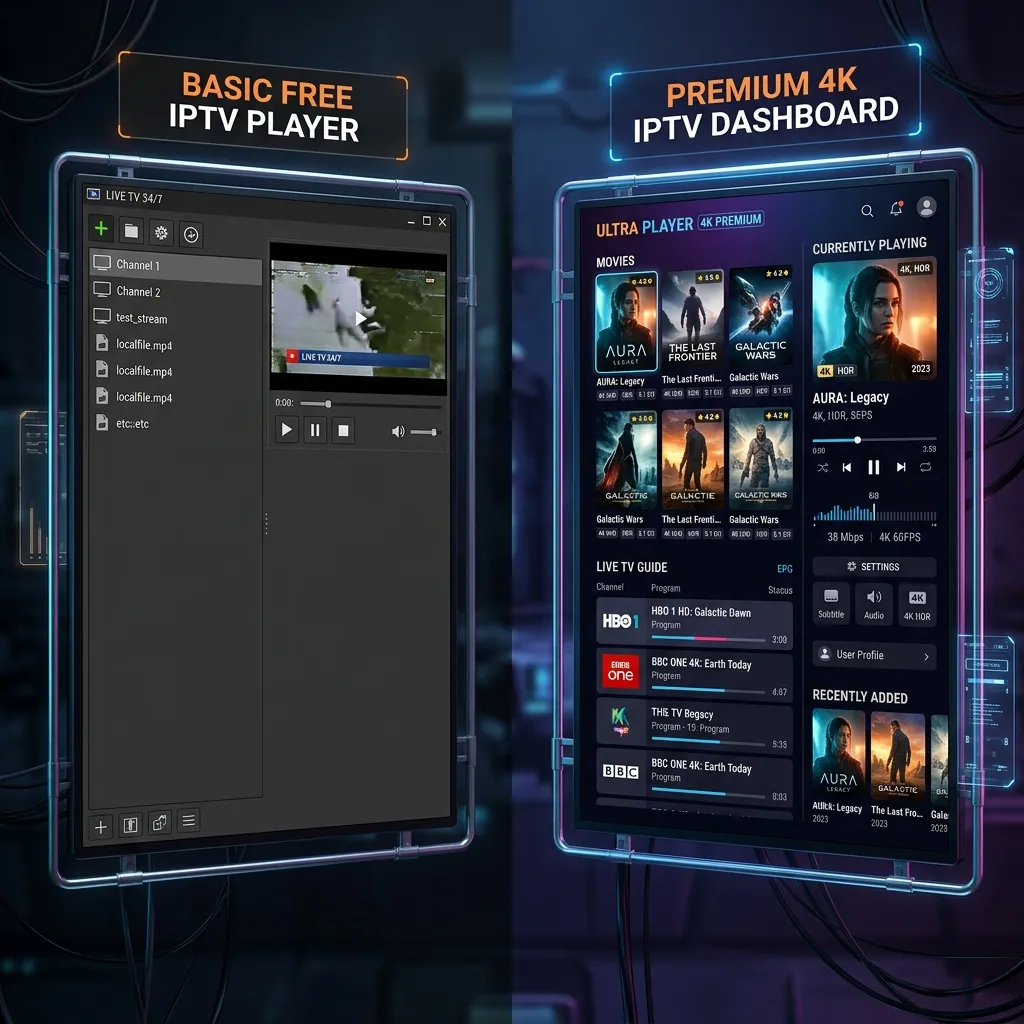
The world of television and home entertainment has undergone a massive paradigm shift over the last decade. The era of being chained to expensive, inflexible traditional cable contracts is rapidly coming to an end. Instead, consumers are embracing the cord-cutting revolution, turning to Internet Protocol Television (IPTV) for a more versatile, affordable, and comprehensive viewing experience. However, stepping into the world of IPTV introduces a new set of choices and technical decisions. Once you have selected a high-quality IPTV service provider, your next crucial decision is choosing the right software to stream your content. This brings us to the ultimate debate: Free vs Premium IPTV Players.
With thousands of applications available across various app stores and websites, it can be overwhelming to determine which media player will best serve your needs. Should you stick with a free app that gets the job done without costing a dime, or should you invest in a premium IPTV player to unlock advanced features, an ad-free experience, and superior performance?
In this exhaustive, 3000+ word guide, we are going to dissect every aspect of free and premium IPTV players. We will explore their features, analyze their performance, evaluate their security, and help you make an informed decision that will elevate your home entertainment setup to the next level. Welcome to the definitive guide on IPTV players brought to you by Smartiflix.
Part 1: Understanding the Foundation of IPTV Players
Before we dive into the comparison, it is absolutely essential to understand what an IPTV player actually is, and more importantly, what it is not. A common misconception among newcomers to the cord-cutting world is conflating the IPTV service provider with the IPTV player itself.
What is an IPTV Player?
An IPTV player is simply a software application—a media player—designed to read, decode, and display streaming media via the internet. It acts as the interface through which you access your live TV channels, movies, and series.
Crucially, an IPTV player does not come with any content of its own.
Think of it like a DVD player. A DVD player is a piece of hardware (or in this case, software) that is completely useless without a DVD disc. In the context of IPTV, your chosen player is the DVD player, and your IPTV subscription is the DVD disc. To watch anything, you must input your subscription credentials (usually in the form of an M3U playlist URL, Xtream Codes API login, or a Stalker Portal MAC address) into the player.
This means that the quality of the streams, the number of channels, the availability of Catch-up TV, and the size of the Video on Demand (VOD) library are entirely dependent on your provider, such as a premium Smartiflix IPTV subscription. However, how you interact with that content—how easy it is to browse channels, view the TV guide, record shows, or customize subtitles—is entirely dependent on your IPTV player.
Why Does Your Choice of Player Matter?
You might wonder, "If the content comes from the provider, why should I care which player I use?"
The answer lies in the user experience (UX). A poor IPTV player can make a world-class IPTV subscription feel clunky, frustrating, and unwatchable. Conversely, a phenomenal premium IPTV player can make your streaming experience rival or even surpass traditional cable or mainstream streaming giants like Netflix or Hulu.
The player determines:
- How smoothly the menus operate.
- Whether the Electronic Program Guide (EPG) loads quickly and accurately.
- If you can watch multiple channels at once (Multi-screen).
- If your device crashes or freezes during high-action sports broadcasts.
- Whether you are bombarded with intrusive advertisements every time you switch a channel.
Part 2: The Appeal of Free IPTV Players
When most users first dip their toes into the IPTV waters, they naturally gravitate toward free IPTV players. It makes perfect sense: you have just paid for a subscription, and you likely want to avoid spending any more money. Free players are abundant, easy to find, and generally capable of basic playback.
What Defines a Free IPTV Player?
A free IPTV player is exactly what it sounds like—an application you can download and use without paying an upfront fee or a recurring subscription. These applications are often supported by in-app advertisements, donations, or act as "lite" versions of premium software designed to upsell you later.
Some of the most popular free IPTV players include:
- VLC Media Player: The legendary, open-source media player that can handle M3U playlists.
- IPTV Smarters Lite: A stripped-down version of the highly popular Smarters app.
- Kodi: A massive, open-source media center that supports IPTV through various add-ons (like PVR IPTV Simple Client).
- GSE Smart IPTV (Free Version): A popular app available on mobile and smart devices, though heavily ad-supported.
- XCIPTV (Free Version): A customizable app that many providers rebrand, but the base free version is widely used.
The Advantages of Free IPTV Players
- Zero Financial Commitment: The most obvious benefit is the cost. Free players allow you to test your newly acquired Smartiflix IPTV subscription without spending an extra penny. This is ideal if you are on a tight budget or just experimenting with cord-cutting.
- Easy Accessibility: Free players are typically readily available on the Google Play Store, Apple App Store, and other major platforms, making them incredibly easy to download and install.
- Open-Source Options: Applications like VLC and Kodi are completely free and open-source, meaning they have massive community support, zero ads, and respect user privacy.
- Adequate for Basic Needs: If you only watch one channel at a time, rarely use the TV guide, and don't care about a cinematic user interface, a free player will often suffice. It will successfully play the video and audio streams provided by your subscription.
The Disadvantages and Hidden Costs of "Free"
As the old adage goes, "If you are not paying for the product, you are the product." While free IPTV players save you money upfront, they come with significant drawbacks that can ruin your viewing experience.
- Intrusive Advertisements: This is the biggest dealbreaker for most users. Free, ad-supported players will often display banner ads across the screen or, worse, force you to watch unskippable 30-second video ads every time you switch a channel or open a movie. This completely destroys the seamless TV zapping experience.
- Clunky and Outdated User Interfaces: Developing a sleek, modern, and highly responsive user interface takes time, money, and professional developers. Free players often feature interfaces that look like they belong in 2010. They can be difficult to navigate with a remote control, making them frustrating to use on Smart TVs or streaming sticks.
- Poor Electronic Program Guide (EPG) Support: The EPG is your TV guide. Free players frequently struggle to sync large EPG files. This results in empty TV guides, "No Information Available" errors, and out-of-sync program schedules, making it impossible to know what is currently airing.
- Lack of Advanced Features: Free players rarely support Catch-up TV (the ability to watch previously aired shows), recording, multi-screen viewing, or robust subtitle customization.
- Security and Privacy Risks: Not all free apps are created by benevolent developers. Many lesser-known free IPTV players harbor malware, track your viewing habits to sell to third parties, or steal your login credentials. We strongly advise reading our guide on Is Smartiflix Safe? to understand the importance of software security.
- No Customer Support: If a free app crashes, fails to load your playlist, or has a bug, you are completely on your own. There is no dedicated support team to assist you.
[!WARNING] Beware of "Free" modified applications found on sketchy third-party websites. Modded APKs that promise "Premium features for free" are heavily associated with malware, ransomware, and credential theft. Always download apps from trusted sources or the official developer's website.
Part 3: The Power of Premium IPTV Players
Once users grow tired of the limitations, ads, and clunkiness of free players, they naturally seek out premium alternatives. Premium IPTV players represent the gold standard of streaming software. They are designed by professional development teams and are built to provide an experience that mimics or beats expensive cable TV set-top boxes.
What Defines a Premium IPTV Player?
A premium IPTV player requires either a one-time purchase (often a lifetime license) or a small annual subscription fee. By charging a fee, the developers can afford to maintain the software, continuously add new features, keep the app completely free of advertisements, and provide customer support.
Some of the most celebrated premium IPTV players include:
- TiviMate Premium: Widely considered the undisputed king of IPTV players for Android TV devices. It offers a flawless, cable-like interface.
- IPTV Smarters Pro: The upgraded, ad-free version of the popular Smarters app, known for its excellent VOD layout.
- iMPlayer: A highly customizable app that offers a premium tier packed with features like cloud syncing and Catch-up.
- Flix IPTV: A premium app with a sleek, modern UI, available across numerous smart TV platforms (Samsung, LG, Android).
- Sparkle TV: A rising star that acts as a DVR and player for IPTV, offering deep integration with Android TV channels.
The Advantages of Premium IPTV Players
- A Completely Ad-Free Experience: The moment you upgrade to a premium player, all advertisements vanish. You can surf through hundreds of channels instantly without ever being interrupted by a pop-up or a video ad. This alone is often worth the admission price.
- Cinematic User Interfaces: Premium players invest heavily in UI/UX design. They offer beautiful, grid-style TV guides, Netflix-style VOD layouts with movie posters, cast information, IMDb ratings, and smooth animations. It makes browsing your Smartiflix IPTV library an absolute joy.
- Flawless EPG Integration: Premium apps are optimized to handle massive EPG data efficiently. Your TV guide will load quickly, stay updated in the background, and allow you to see schedules days in advance.
- Catch-up and Timeshift Mastery: If your provider offers Catch-up TV (the ability to watch programs that aired days ago), premium players handle this flawlessly, often displaying a small clock icon next to the channel to indicate Catch-up availability. They also allow you to pause, rewind, and fast-forward live TV seamlessly.
- Multi-Screen Capabilities: Want to watch four NFL games at the same time? Premium players like TiviMate offer exceptional multi-screen (picture-in-picture) functionality, allowing you to split your screen and stream multiple channels simultaneously (provided your subscription allows for multiple connections).
- Robust Recording Features: Premium players often act as a full Digital Video Recorder (DVR). You can schedule recordings for future shows, record live TV to an external USB drive or local network storage (NAS), and build your own offline library.
- Multiple Playlist Management: If you have subscriptions to different providers, or backup playlists, premium players let you add multiple M3U or Xtream Codes accounts and switch between them effortlessly, or even merge their categories into one massive guide.
- Constant Updates and Support: When you pay for software, you fund its continued development. Premium players receive regular updates that fix bugs, improve performance on new hardware, and add cutting-edge features.
The Disadvantages of Premium IPTV Players
- The Cost: The only real downside is that you have to pay. While the cost is usually quite low (often ranging from $5 to $30 for a lifetime license or an annual fee), it is an additional expense on top of your Smartiflix Pricing plan.
- Device Locking: Some premium licenses are tied to a specific device MAC address or a specific app store account. If you buy a new TV, you might need to transfer the license or, in worst-case scenarios, buy it again depending on the developer's terms.
- Overkill for Casual Users: If you only open your IPTV app once a month to watch a specific news channel for 10 minutes, the advanced features of a premium player might be completely unnecessary for you.
Part 4: Feature-by-Feature Deep Dive Comparison
To truly understand which route is best for you, we need to put free and premium players head-to-head across the most critical features that define a streaming experience.
1. User Interface (UI) and Navigation
Free Players: The UI is usually functional but utilitarian. You will often find simple list-based menus that require tedious scrolling. Navigating through thousands of VOD titles can be a nightmare due to a lack of proper categorization or slow loading thumbnails. Mobile-first free apps often port poorly to television screens, meaning you have to use a frustrating "mouse toggle" feature on your remote to click on things.
Premium Players: The UI is where premium apps truly shine. They offer a "10-foot UI," meaning the interface is specifically designed to look gorgeous and be easily navigable with a standard D-pad remote control from your couch. VOD sections look like modern streaming giants, with high-resolution posters, plot summaries, and trailers. The live TV experience features a beautifully rendered grid guide that is easy to read and interact with.
2. Electronic Program Guide (EPG) Performance
Free Players: EPG handling is a common weak point. Free apps often struggle to process the large XMLTV files provided by IPTV services. They may crash during EPG updates or simply display "No Data." Additionally, you often have to manually trigger an EPG refresh, which can take several minutes.
Premium Players: Premium apps handle EPG data brilliantly. They download updates in the background automatically, cache the data efficiently to prevent slowdowns, and allow you to assign alternative EPG sources if your provider's guide is missing information. The result is a TV guide that is always populated, accurate, and ready the moment you open the app.
3. Catch-up TV and VOD Integration
Free Players: Many free players do not support Catch-up TV at all. If you miss a live sports event or a TV show, you are out of luck. When it comes to VOD (Movies and Series), free players often just dump them into a massive, unorganized list without resuming capabilities (meaning if you stop a movie halfway, you have to start from the beginning next time).
Premium Players: Catch-up is fully integrated into the EPG grid. You simply scroll back in time on the TV guide and click on a past show to start watching. For VOD, premium players offer features like "Continue Watching" tracking, automatic episode progression for series, subtitle downloading (via integrations like OpenSubtitles), and audio track selection.
4. Multi-Screen and Picture-in-Picture (PiP)
Free Players: This feature is almost non-existent in the free tier. You are limited to watching one stream at a time.
Premium Players: Apps like TiviMate Premium are famous for their Multi-view feature. You can split your screen into 2, 3, 4, or even up to 9 distinct panels, streaming different channels in each. This is an absolute game-changer for sports fans who want to track multiple games simultaneously.
5. Customization and Control
Free Players: Customization is generally limited to changing the background color or adjusting the text size slightly. You are stuck with the default layout and behavior.
Premium Players: The level of customization is staggering. You can hide specific channel groups you don't care about, rearrange the order of categories, customize remote control button mapping (e.g., long-press "OK" to open Catch-up), adjust video buffer sizes to prevent stuttering, and set up parental PIN codes to lock away adult or mature content.
[!TIP] Pro Tip for Parents: Premium IPTV players offer far superior Parental Control features compared to free apps. You can lock entire categories or specific channels behind a secure PIN, ensuring your children only access family-friendly content.
Free vs Premium: The Ultimate Summary Table
To help you visualize the differences, here is a comprehensive breakdown:
| Feature/Capability | Free IPTV Players | Premium IPTV Players |
|---|---|---|
| Cost | $0 | Usually $5 - $30 (Lifetime/Annual) |
| Advertisements | Yes (Often intrusive banners/videos) | None |
| User Interface | Basic, sometimes clunky | Modern, sleek, cable-like |
| EPG Support | Basic, often slow or buggy | Excellent, fast, background syncing |
| Catch-up TV Support | Rare or poorly implemented | Full integration directly in the TV Guide |
| VOD Experience | Simple lists, no "Resume" tracking | Netflix-style layout, "Continue Watching" |
| Multi-Screen (Multi-view) | No | Yes (Watch 2-9 channels at once) |
| Recording (DVR) | Very Rare | Yes (Record live TV, schedule future recordings) |
| Multiple Playlists | Usually limited to 1 or 2 | Unlimited, merge capabilities |
| Customer Support | None (Community forums only) | Dedicated developer support/Discord channels |
| Customization | Minimal | Extensive (Button mapping, hiding groups, themes) |
Part 5: Device Compatibility and Hardware Considerations
Your choice between a free or premium player must also factor in the hardware you are using. An IPTV player is only as good as the device running it.
Smart TVs (Samsung Tizen & LG WebOS)
The app ecosystems for proprietary Smart TV operating systems like Samsung Tizen and LG WebOS are quite restrictive.
- Free Options: You will find apps like Smart IPTV (which actually requires an activation fee after a trial) or SS IPTV. These apps are notoriously difficult to set up, requiring you to upload your playlist via a web browser on a computer. They are functional but severely lack advanced features.
- Premium Options: Apps like Flix IPTV or SET IPTV dominate here. While they cost money to activate, they offer a vastly superior experience with better VOD layouts and faster channel switching.
Android TV and Firestick
This is where IPTV truly flourishes. Devices like the Nvidia Shield TV, Chromecast with Google TV, and the Amazon Fire TV Stick offer massive flexibility. If you are setting up a Firestick, we highly recommend checking out our comprehensive guide on Smartiflix Firestick installation.
- Free Options: There are hundreds of free Android IPTV apps. Smarters Lite is the most popular, and it works adequately on Firesticks. However, navigating free apps with the Firestick remote can sometimes be imprecise.
- Premium Options: This is the domain of TiviMate Premium. It is widely considered the absolute best IPTV player in existence, and it is exclusively available on Android TV/Fire OS devices. It is optimized perfectly for low-power streaming sticks, ensuring smooth 60fps menus and flawless playback even on older Firesticks.
Apple Devices (iOS & tvOS)
Apple's walled garden means fewer choices, but high-quality ones.
- Free Options: GSE Smart IPTV used to be the go-to, but it is heavily laden with ads. VLC is an option, but it's terrible for navigating hundreds of channels.
- Premium Options: iPlayTV and Smarters Player Pro (the iOS version) are the premium titans here. They integrate beautifully with the Apple TV interface and provide a buttery-smooth experience.
Part 6: The Hidden Dangers: Security, Privacy, and Buffering
Let's address the elephant in the room: security and performance. It is easy to overlook these factors when you are focused on saving a few dollars, but they are critical.
Security and Malware
The open nature of Android means anyone can create an app and distribute it as an APK file. Many "free" IPTV players found on random websites or shady Telegram groups are injected with malware. They may operate as background crypto-miners, slowing your device to a crawl, or they may scrape your network for vulnerabilities.
Premium apps, especially those available directly through the Google Play Store or Apple App Store, undergo security reviews. When you purchase an app from a known developer, you are paying for peace of mind. To learn more about securing your streaming environment, refer to our deep dive on Is Smartiflix Safe?.
The Buffering Myth
A common misconception is that a premium IPTV player will magically fix buffering issues. This is false.
Buffering is caused by three things:
- A poor internet connection on your end.
- A weak Wi-Fi signal to your device.
- Server-side issues from your IPTV provider.
An IPTV player cannot fix a slow internet connection. However, premium players can help mitigate minor stutters by allowing you to manually adjust the video buffer size. By increasing the buffer, the app downloads a few extra seconds of video ahead of time, smoothing out minor network hiccups. Free players rarely offer this advanced network configuration.
For the absolute best, buffer-free streaming experience, you need a high-quality provider with robust servers, which is exactly what Smartiflix IPTV offers, paired with a premium player optimized for your hardware.
Part 7: Step-by-Step: Setting Up Your Chosen IPTV Player
Regardless of whether you choose a free or premium route, the setup process is generally similar. Here is a universal guide to getting started. If you need device-specific instructions, please visit our detailed Smartiflix Installation hub.
Step 1: Obtain Your IPTV Credentials
Upon subscribing to a service like Smartiflix, you will receive an email containing your login details. You will need one of the following:
- An M3U URL: A long web link that points to a file containing your channel list.
- Xtream Codes API: The most preferred method. You will receive a Server URL, a Username, and a Password.
- MAC Address Portal: Used for specific apps like STB EMU. You provide your device's MAC address to the provider.
Step 2: Install the Application
- On Android/Google TV: Open the Google Play Store and search for your chosen app (e.g., "TiviMate" or "IPTV Smarters").
- On Firestick: You may need to "sideload" the app using the 'Downloader' application, as Amazon frequently removes IPTV players from their official store.
- On Smart TVs: Search your TV's app store (Samsung Apps or LG Content Store) for apps like "Flix IPTV" or "IBO Player".
Step 3: Enter Your Credentials
Launch the app and select "Add Playlist" or "Login with Xtream Codes." Enter the exact details provided in your welcome email. Pay extreme attention to typos, especially in M3U URLs. One wrong character will cause the connection to fail.
Step 4: Allow the Guide to Sync
Once logged in, the app will download your channels, VOD library, and the EPG. This first sync can take a few minutes depending on the size of the playlist. Let it finish completely.
Step 5: Customize Your Experience
If you are using a premium player, now is the time to dive into the settings. Hide international channel groups you don't speak the language of, set up your Catch-up preferences, and adjust the UI theme to your liking.
Part 8: The Verdict - Which One Should You Choose?
The debate between free and premium IPTV players is not about finding the "best" app in a vacuum; it is about finding the best app for your specific viewing habits.
Who Should Use a Free IPTV Player?
You should stick to a free player if:
- You are a completely casual viewer who only watches one or two specific channels occasionally.
- You are testing an IPTV trial and want to verify the stream quality before fully committing.
- You are using a computer and are comfortable using VLC for basic playback.
- You absolutely refuse to spend any money beyond the base subscription and are willing to tolerate advertisements and clunky interfaces.
Who Should Invest in a Premium IPTV Player?
You should upgrade to a premium player if:
- You are replacing your traditional cable or satellite TV subscription and want an experience that feels identical, if not better.
- You are a sports fan who needs features like Multi-view to watch multiple games simultaneously.
- You heavily utilize Catch-up TV and want it integrated seamlessly into a beautiful TV guide.
- You possess a large VOD library and want it displayed with beautiful posters, trailers, and IMDb ratings.
- You value a fast, responsive, and completely ad-free user interface.
- You want to set up recording schedules for your favorite shows.
The Smartiflix Recommendation
At Smartiflix, our philosophy is simple: Do not bottleneck a premium service with subpar software.
If you are investing in a high-quality, stable IPTV subscription, using a free, ad-ridden player is akin to putting cheap, low-grade fuel into a high-performance sports car. It will run, but it won't run well.
We highly recommend utilizing a premium application. The upfront cost (which is often less than a single month of traditional cable) pays for itself immediately in the form of zero frustration, zero advertisements, and a genuinely luxurious viewing experience. For Android and Firestick users, the undisputed champion is TiviMate Premium. For Apple users, iPlayTV is a phenomenal choice. For Smart TV owners, Flix IPTV or IBO Player Pro are excellent investments.
Ultimately, the goal of cord-cutting is not just to save money, but to enhance your entertainment freedom. By pairing a robust Smartiflix IPTV package with a top-tier premium player, you achieve the pinnacle of modern home entertainment.
Ready to begin your premium streaming journey? Explore our Smartiflix Pricing plans today, find the right player for your device, and completely transform the way you watch television. Welcome to the future.
For further reading, explore our homepage at Smartiflix to discover more guides, tutorials, and everything you need to master the world of IPTV.